- Geospatial Data Engineering
- problem-solving
- solution-design
- geo-tech
When a Polygon Gap Becomes a Revenue Gap
A gap between two service-area polygons costs twice: bookings that can't happen, and bookings that happen but aren't counted. How we found the holes and closed both.
What does a gap between two polygons cost?

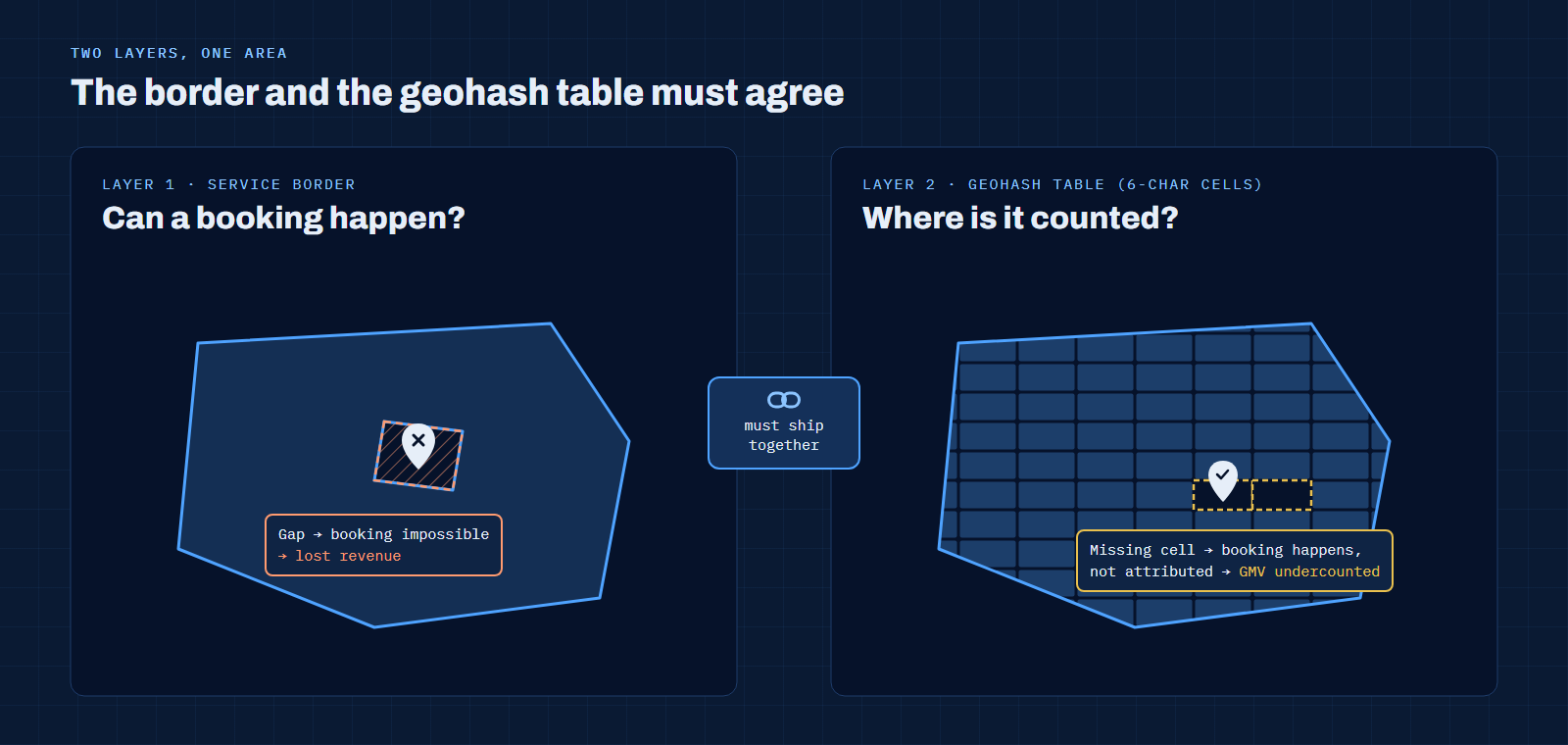
It costs twice. A gap in a service border means a passenger standing there can't book a ride at all: lost revenue. A gap in the geohash table behind it means a ride that did happen isn't attributed to any area: revenue that exists but doesn't show up where the business is looking.
At Grab, both layers were polygons on a map, and both had holes. This article is about how those holes appeared, how we found exactly where they were, and why fixing one layer without the other only solves half the problem.
How do you notice a gap in a service border?
A service border is the polygon that switches a service on for an area. When a city expands, a new border is drawn and configured, and everything inside it can be booked. When the border has a hole, the symptoms rarely say "polygon".
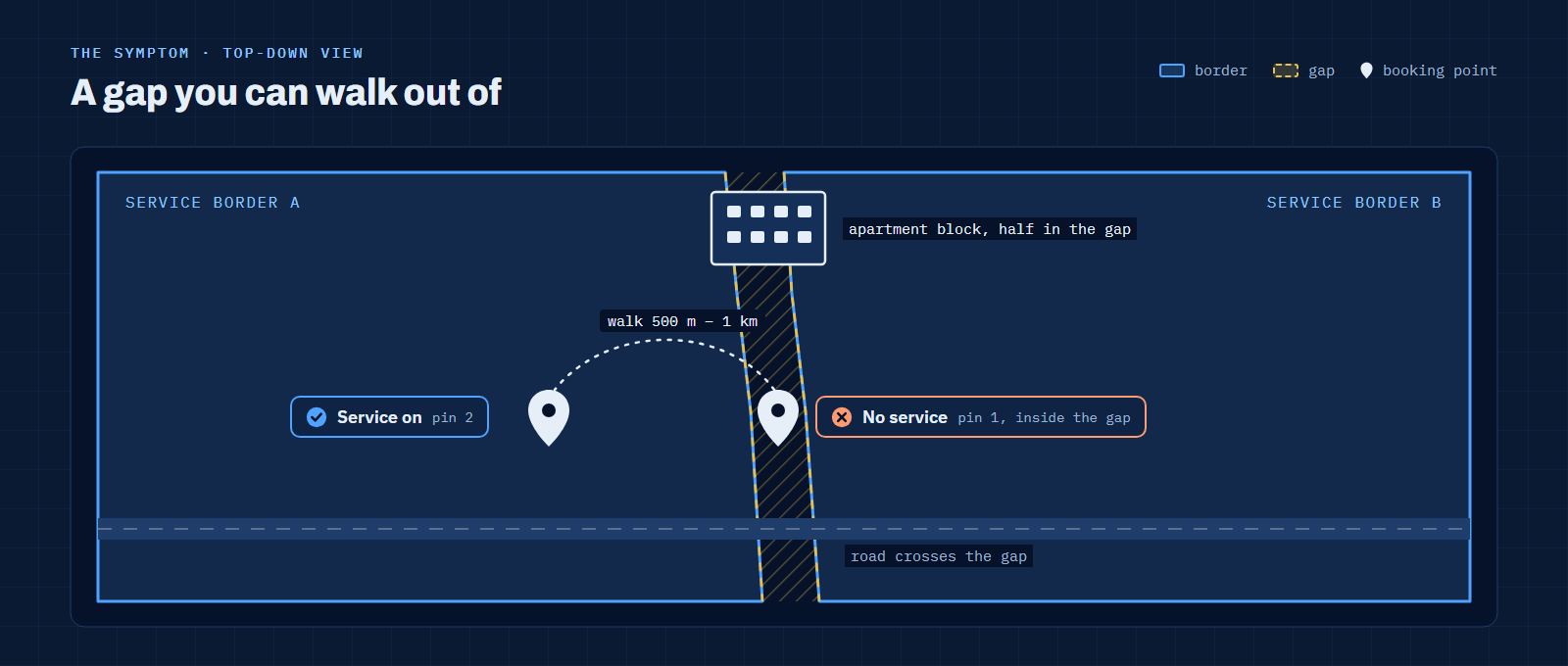
- A passenger can't book from one spot, but walks 500 metres to a kilometre and the service suddenly works. That pattern almost always means a gap between two borders, or a border that stops short.
- Merchants don't appear for customers on the wrong side of the line.
- Drivers or merchants report it, but rarely, and usually from small areas such as ports or stretches near the coast.
- Usage drops suddenly in one area. This happened when a city was split into two operating areas and the split didn't go cleanly: a wrong configuration or a corrupted border file left part of the city outside both.
- Routes take odd detours when a gap cuts between two roads, so the suggested route goes around it instead of through.
 Open full size
The costly part is the first symptom. A gap over an apartment block, a housing estate or a shopping centre is demand that exists and simply can't be served.
Why did the gaps exist in the first place?
Mostly because the business grew faster than its map data. Many service borders were drawn city by city, before a dedicated map operations team existed, by people whose job was to launch a service, not to keep polygons topologically clean. Neighbouring borders were drawn separately, so their edges didn't quite meet.
Expansion added to it. A new area could go live before the map team had seen the plan, and city splits meant editing borders that other systems already depended on. None of this was anyone's mistake in isolation. It was what happens when geometry is treated as configuration rather than as data with rules.
What is a geohash, and why does it sit in the booking table?
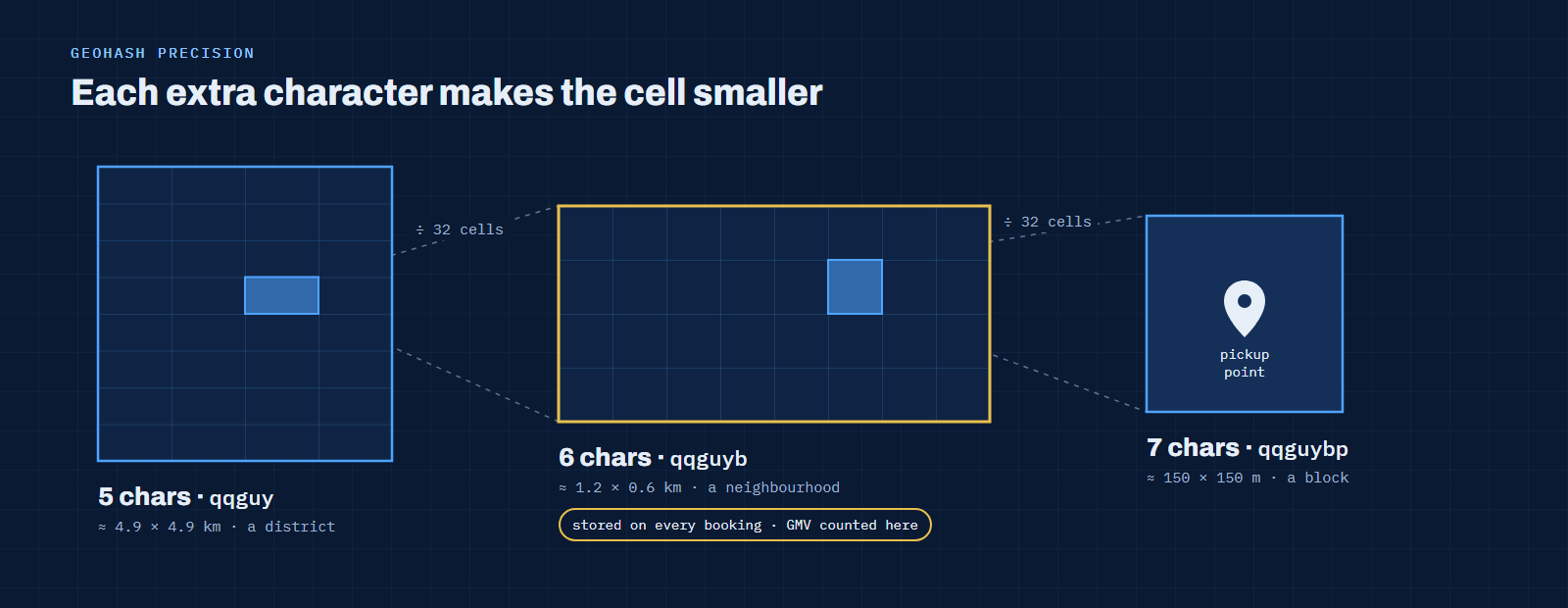
A geohash is a short code that names a rectangular cell on the map. Each extra character makes the cell smaller:
| Precision | Example | Approximate cell size |
|---|---|---|
| 5 | qqguy |
4.9 km × 4.9 km |
| 6 | qqguyb |
1.2 km × 0.6 km |
| 7 | qqguybp |
150 m × 150 m |
 Open full size
Six characters is a practical size for operations: small enough to separate one neighbourhood from the next, large enough to aggregate. In our data, every booking carried the 6-character geohash of its pickup point, and a separate table mapped each geohash to an area. Revenue and GMV were counted per geohash, which made it easy to target a push at exactly the cells that needed it.
That design has one weak point: the mapping table must cover every cell inside every service border. A typical report joins bookings to that table:
-- Simplified illustration (not production code)
select g.area_name,
       count(*)   as bookings,
       sum(b.gmv) as gmv
from bookings b
join geohash_area g
  on g.geohash6 = b.pickup_geohash6
group by g.area_name;
If a cell is missing from geohash_area, every booking in that cell silently disappears from this total. Nothing errors. The ride happened, the money moved, and the area report is simply smaller than reality. A left join doesn't fix the business problem either; it just moves the same bookings into an "unknown" bucket nobody owns.
 Open full size
This is why an expansion has to ship as one package: a correct border and a complete geohash table that covers it, released together.
How do you find exactly where the gap is?
Looking at the map isn't enough; a gap of a few metres is invisible at city zoom. We worked from the data instead.
- Extract the borders from the service configuration as GeoJSON, so they can be queried like any other table.
- Find the holes by merging neighbouring borders and listing every hole left inside the result.
- Join booking points and area codes to the borders and the geohash table, to see where real activity falls outside a border or inside a cell with no area.
- Check topology in QGIS: overlaps, gaps and invalid geometry, edge by edge.
- Fix the geometry, then regenerate the geohash table from the corrected border, so the two layers match again.
-- Simplified illustration: holes left between neighbouring service borders
with merged as (
  select (st_dump(st_union(geom))).geom as geom
  from service_borders
),
holes as (
  select st_makepolygon(st_interiorringn(geom, n)) as hole
  from merged,
       generate_series(1, st_numinteriorrings(geom)) as n
)
select hole,
       st_area(hole::geography) as area_m2
from holes
order by area_m2 desc;
The trade-off sits in step 5. Snapping neighbouring edges together with a tolerance closes slivers quickly, but a tolerance that is too generous also pulls a border over places where the service shouldn't run, such as restricted port areas. Automatic snapping handled the thin slivers; anything larger was checked by hand before it went live.
How did a stream of incidents become a project?
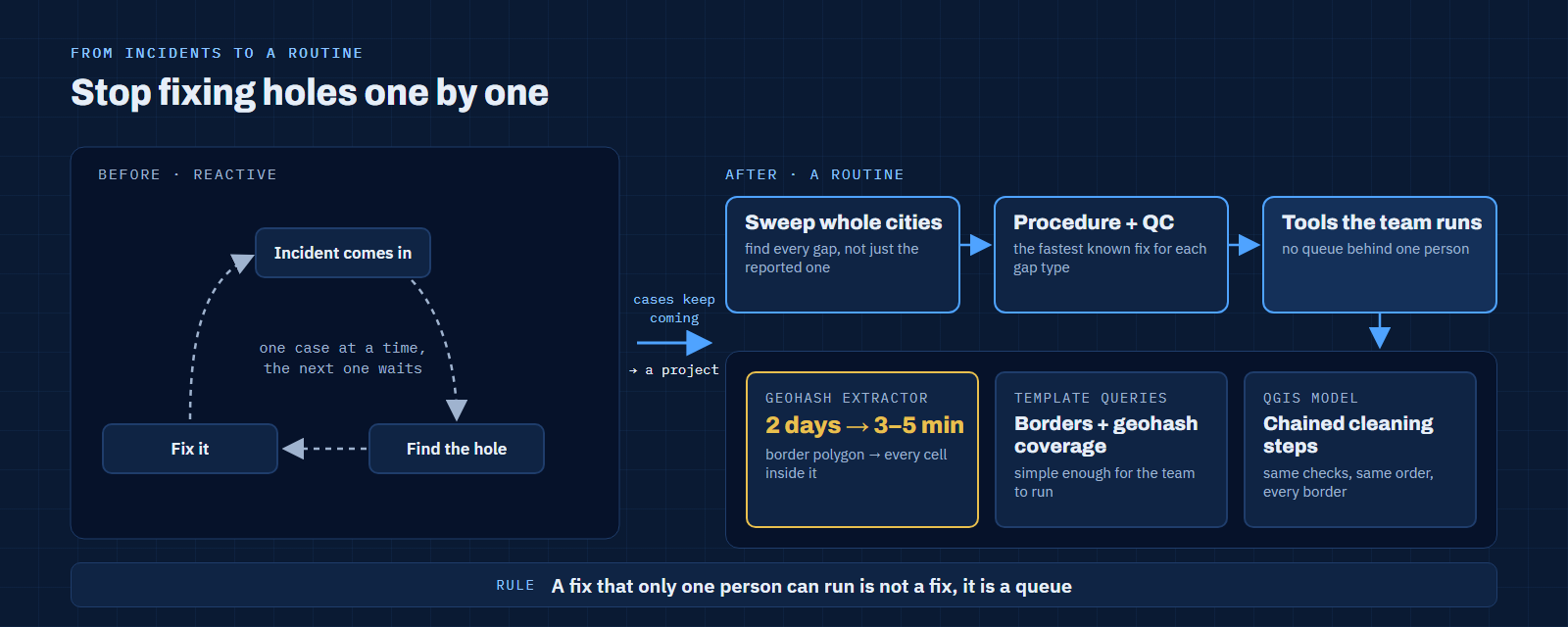
At first my team was simply on the receiving end: an incident came in, we found the hole, we fixed it. When the cases kept coming, we stopped treating them one by one. We swept whole cities for gaps, escalated the pattern, and turned it into a project with a standard procedure, quality checks and a known fastest way to resolve each type of gap.
 Open full size
The parts I built myself were the ones that let the rest of the team move without me:
- A geohash extractor that turns a border polygon into its complete list of geohash cells, cutting a two-day manual workflow to 3–5 minutes. I wrote about it in a self-service geohash tool for non-GIS teams.
- Template queries for checking borders and geohash coverage, simple enough for the team I led to run on their own.
- A QGIS model that chained the cleaning steps, so every border went through the same checks in the same order.
The point of all three was the same: a fix that only one person can run is not a fix, it is a queue.
What is the reusable pattern?
Any system that assigns activity to areas has the same two layers: one that decides what is allowed where, and one that decides where things are counted. Delivery zones, sales territories, tax districts and franchise areas all work this way.
- Release boundaries as a pair. A border change and its lookup table ship together, or not at all.
- Validate topology on every edit, not after a complaint. Gaps and overlaps are cheap to catch at the moment of change.
- Measure what falls outside. Bookings outside every border and rows with no matching cell are metrics, not noise.
- Distrust quiet joins. If a dimension table can be incomplete, the report built on it can be wrong without any error.
- Make the check runnable by the team. Templates and models turn one expert's judgement into a routine.
The next article in this series moves from geometry to metrics: a number that was wrong not because of its formula, but because of what went into it.
FAQ
What is a geohash?
A short string that names a rectangular cell on the map. Longer strings name smaller cells, and cells that share a prefix are near each other, which makes geohashes easy to store, index and group in ordinary databases.
Why use 6-character geohashes for revenue?
At about 1.2 km × 0.6 km, a 6-character cell is small enough to target one neighbourhood and large enough to aggregate bookings meaningfully. Smaller cells give finer targeting but much larger lookup tables.
What is a sliver polygon?
A thin, usually unintended gap or overlap between two polygons that should share an edge. Slivers come from drawing neighbouring shapes separately and are often invisible until you zoom in or run a topology check.
References
- Geohash, Wikipedia
- ST_GeoHash, PostGIS documentation
- From 2 days to 5 minutes: a self-service geohash tool for non-GIS teams, earlier article on this site
- The Hidden Data Dependencies a Map Migration Exposes, the previous article in this series
Last updated: 29 October 2026.