- Solution Architecture
- solution-design
- problem-solving
- geo-tech
From 2 days to 5 minutes: a self-service geohash tool for non-GIS teams
Non-GIS teams needed geohash lists for service zones and waited two days on a manual workflow run by GIS specialists. I designed a self-service Python and Streamlit tool that cuts it to 3–5 minutes: draw, paste or upload a polygon, pick a precision, download.
The short answer
Teams without GIS skills needed geohash lists for new service zones, and getting one meant a two-day manual workflow run by GIS specialists. I designed and built a self-service tool in Python and Streamlit that turns a polygon into a geohash list in 3–5 minutes: draw, paste or upload a shape, pick a precision, download. The tool is still in production and was a top-5 finalist at an internal Product Ops hackathon.
The lesson is less about geohashes than about solution design: the fastest workflow is the one the requesting team can run themselves.
What a geohash is, and why teams need lists of them
A geohash is a short string that names a rectangular cell on the map, for example qqguy. Each extra character makes the cell smaller: precision 5 is roughly a neighbourhood (~5 km), precision 6 a block (~1.2 km), precision 7 a street segment (~150 m).
Operations systems use geohash lists as a simple, database-friendly way to say "this area": service zones, geofences for notifications, dispatch coverage, or partition keys in a data warehouse. When a city team launches a zone, someone has to turn the polygon on the map into that list.
The problem: a two-day queue for a five-minute task
The old workflow depended on specialists and copy-paste:
- A business or operations team asks the GIS team for coverage of a new zone.
- A GIS specialist exports the polygon, runs a script, checks the result on a map and formats the output.
- The list is copied by hand into the target system.
Each step was small, but the queue around it took about two days, and every new zone or revision restarted it. The real bottleneck was not computing the geohashes. It was that only GIS specialists could run the steps.
Design principles
I set four rules before writing code:
- No GIS skills required. If the user has to know what EPSG:4326 means, the tool has failed.
- Meet the input where it already is. Some people have a shape in mind, some have coordinates in a spreadsheet, some have a GeoJSON file. All three must work.
- Show before you export. Every result is drawn on a map, so the requester checks the coverage themselves instead of trusting a CSV.
- Export in the receiver's format. The list goes to databases, queries, APIs and GIS tools, so it must be one click in each format.
The architecture
 Open full size
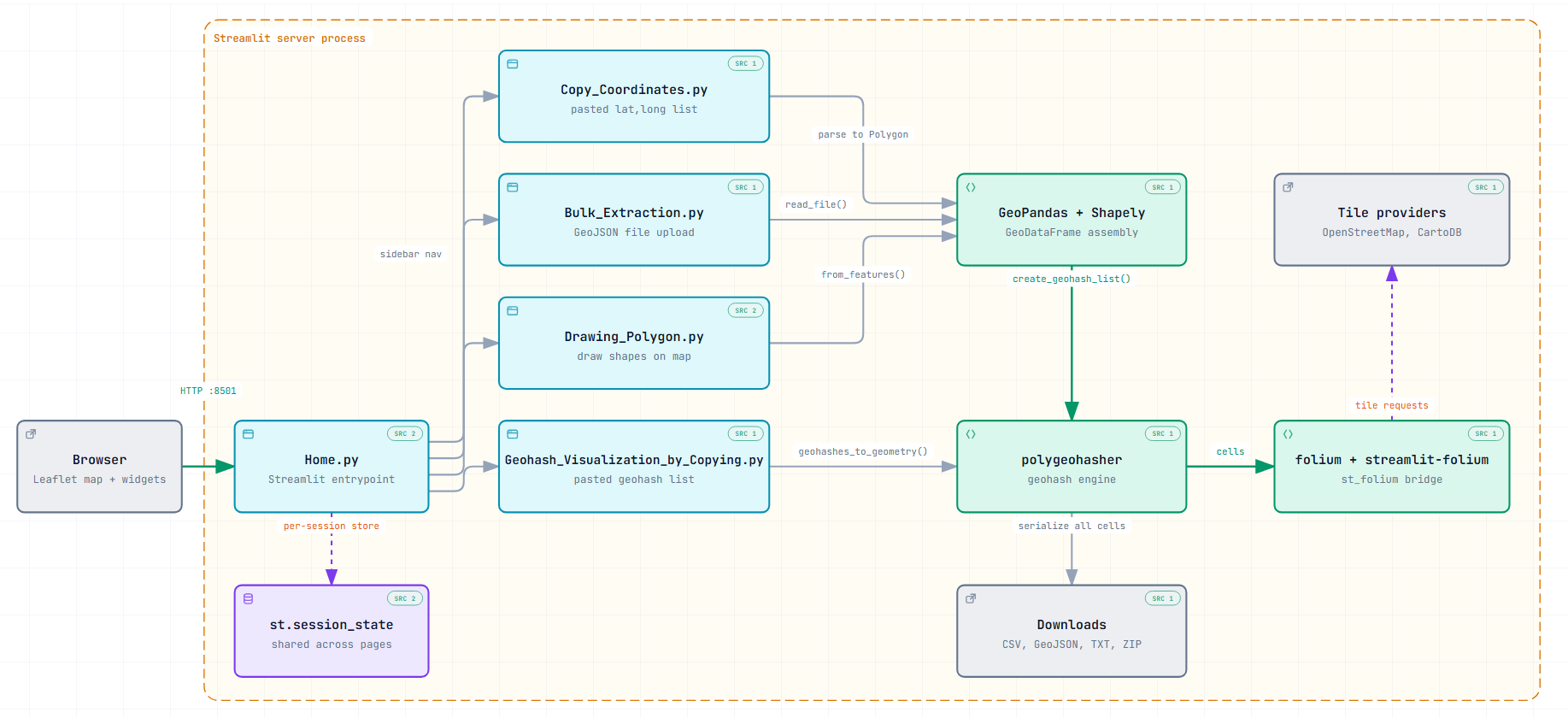
Notice how the three input paths converge on a single Shapely polygon before anything else happens. That one decision keeps the conversion logic in one place:
- Inputs. Draw on a Folium/Leaflet map (with a custom
NewDrawextension that keeps drawn shapes), paste coordinates, or upload a GeoJSON file. - Conversion.
polygeohasherturns the polygon into geohash cells at the chosen precision (1–12), in either inner mode (cells strictly inside the boundary) or full coverage mode (every cell that touches it). - Output. The cells are drawn on the map with colour by precision, plus counts and coverage stats, and can be downloaded.
Five modes, one mental model
| Mode | Input | Output | Typical use |
|---|---|---|---|
| Draw polygon | Freehand shape on the map | Geohash list + overlay | New service zone, geofence |
| Copy coordinates | Comma-separated lat/lng | Geohash list + map | Existing coordinate data |
| Bulk extraction | GeoJSON upload | Coverage for a whole area | City or regional coverage |
| Geohash visualiser | Pasted geohash strings | Cells on the map | QA of an existing list |
| GeoJSON → CSV | GeoJSON polygon | Coordinates as CSV | Pipeline preprocessing |
The visualiser mode turned out to matter as much as the converters: it lets anyone check a list someone else produced, which removes another round trip to the GIS team.
Choosing a precision
| Precision | Cell size (approx.) | Example use |
|---|---|---|
| 5 | ~5 km | District / neighbourhood |
| 6 | ~1.2 km | Block (default) |
| 7 | ~150 m | Street segment |
| 8 | ~38 m | Building |
The default is 6, a sensible block-level grain for most zone work. Higher precision multiplies the number of cells quickly, so the tool has a cell count limiter to keep the map responsive on large areas.
Trade-offs
- Streamlit over a custom web app. Python-native and fast to ship, with no front-end code to maintain. The trade-off is less control over the UI, which is acceptable for an internal tool where speed of iteration matters more than pixel polish.
- Geohash, not H3, for now. The receiving systems expected geohash lists, so geohash came first. H3 support is on the roadmap.
- Exports over integrations. Downloads (CSV, comma/newline TXT, JSON array, GeoJSON, ZIP) work with every receiving system today. A direct push to PostGIS or BigQuery, and an API wrapper, are later steps.
Results
- A two-day request cycle became a 3–5 minute self-service task.
- Teams without GIS training produce and validate their own geohash coverage.
- The tool is still in production and was a top-5 finalist at an internal Product Ops hackathon.
The bigger win is the one that doesn't show in a metric: the GIS team stopped being a queue for routine conversions and could spend that time on work that needs them.
FAQ
What is the difference between inner and full coverage? Inner coverage keeps only the cells that lie completely inside the polygon, so nothing spills outside the zone. Full coverage keeps every cell that touches the polygon, so no part of the zone is missed. Geofences for notifications usually want inner; dispatch coverage usually wants full.
Which geohash precision should I use for a service zone? Precision 6 (about 1.2 km) is a good default for city service zones. Use 7 for street-level detail and 5 for large regional coverage. Each step up multiplies the number of cells by 32.
Can I try it? Yes. A public version is live on Streamlit, and the code is on GitHub under the MIT licence.
Stack: Python 3.12, Streamlit, Folium + Leaflet.draw, GeoPandas, Shapely, polygeohasher. Last updated: 20 October 2026.